How to Boost an Ad on Facebook for Best Results in 2024
Are you looking to drive more traffic to your blog?
Let's walk you through step-by-step how to boost an ad on Facebook.
Social media marketing does not have to be complicated.
Boosting an ad on Facebook is a user-friendly and cost-effective method to increase your reach and engage more people.
In this blog post, we'll dive into boosting a post on Facebook, discuss the difference between a boosted post and an ad, and explore some best practices to help you get the most out of your ad budget.
Table of Contents (click to expand)
- What is a “Boost Post” on Facebook?
- How to Boost an Ad on Facebook: A Step-by-Step Guide
- Facebook Boost Post vs. Facebook Ads: What's the Difference?
- When to Use Boosted Posts and When to Use Facebook Ads
- Best Practices for Boosting a Post on Facebook
- FAQs on How to Boost an Ad on Facebook
- How much does it cost to boost a Facebook ad?
- How does boosting an ad on Facebook work?
- How do I boost my Facebook listing?
- Why can't I boost my FB ad?
- Is boosting ads on Facebook worth it?
- Is $100 enough for Facebook ads?
- Is it better to run a Facebook ad or boost a post?
- Is boosting better than ads?
- What's the difference between a boost and an ad on Facebook?
- How can I boost my FB post without paying?
- How often should you boost posts on Facebook?
- Does Facebook ads charge per day?
- Final Thoughts
What is a “Boost Post” on Facebook?

A boost post is a powerful tool on Facebook.
It lets you promote your current posts to a wider, targeted audience. By using this feature, you can increase your content's reach, especially on social media.
This requires a payment, which varies based on your desired visibility.
With a boosted post, your main goal is to get more likes, comments, and shares. This helps engage your target audience effectively.
In short, a Facebook boost post can be a valuable investment to grow your online presence.
How to Boost an Ad on Facebook: A Step-by-Step Guide
Are you ready to amplify your Facebook posts and attract more people to your content?
Understanding how to boost an ad on Facebook can be a game-changer for your online presence.
In this step-by-step guide, we will walk you through boosting a post, so you can confidently reach a larger audience and increase engagement on your carefully crafted content.
Choose the post you want to boost: Select a post with engaging content, a clear call-to-action, or time-sensitive information.
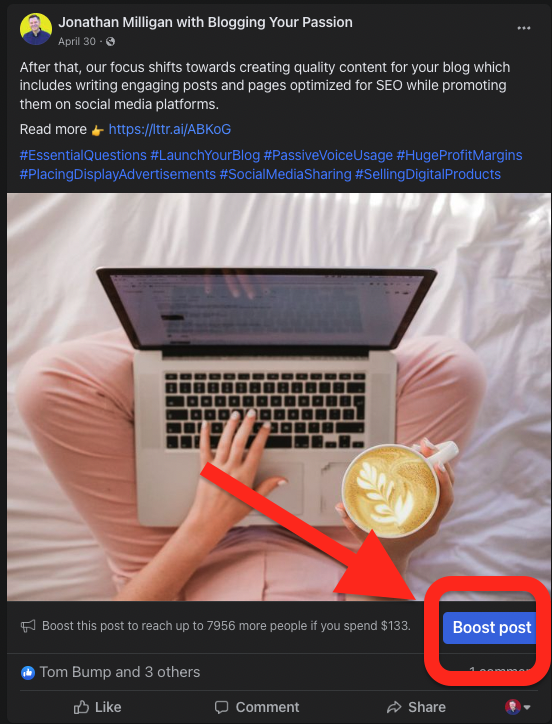
Click on the "Boost Post" button: You'll find this button below the post on your Facebook business page.
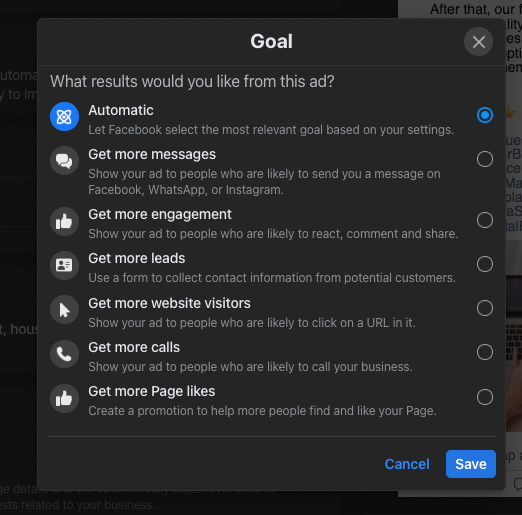
Set your objective: Define the purpose of your campaign, such as driving traffic to your website or getting more leads.
Choose your target custom audience: Define your ideal audience's demographics, interests, and behaviors. Be specific to increase the chances of reaching the right people. You have lots of targeting options to consider.
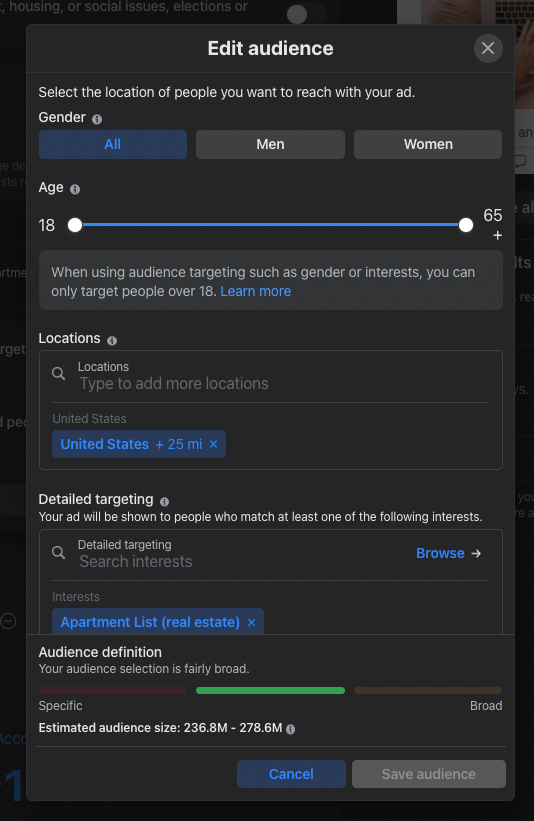
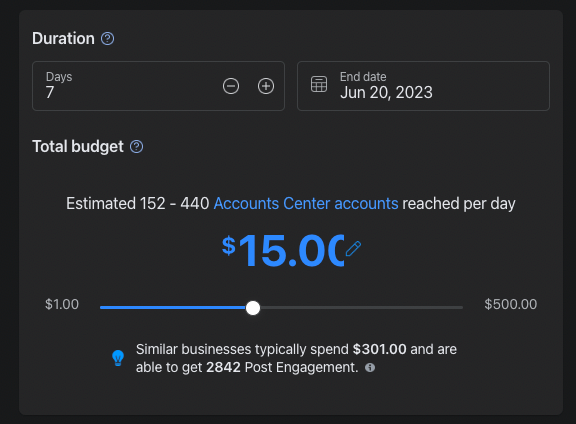
Set your budget: Decide how much you want to spend on the campaign. You can start with a small budget and gradually increase it if you see positive results.
Select the duration: Determine how long your boosted post will run. A short period (3-7 days) is often suitable for testing the effectiveness of your campaign.
Review and submit your campaign: Once you've made all your selections, review your boosted post and click "Submit" to launch it.
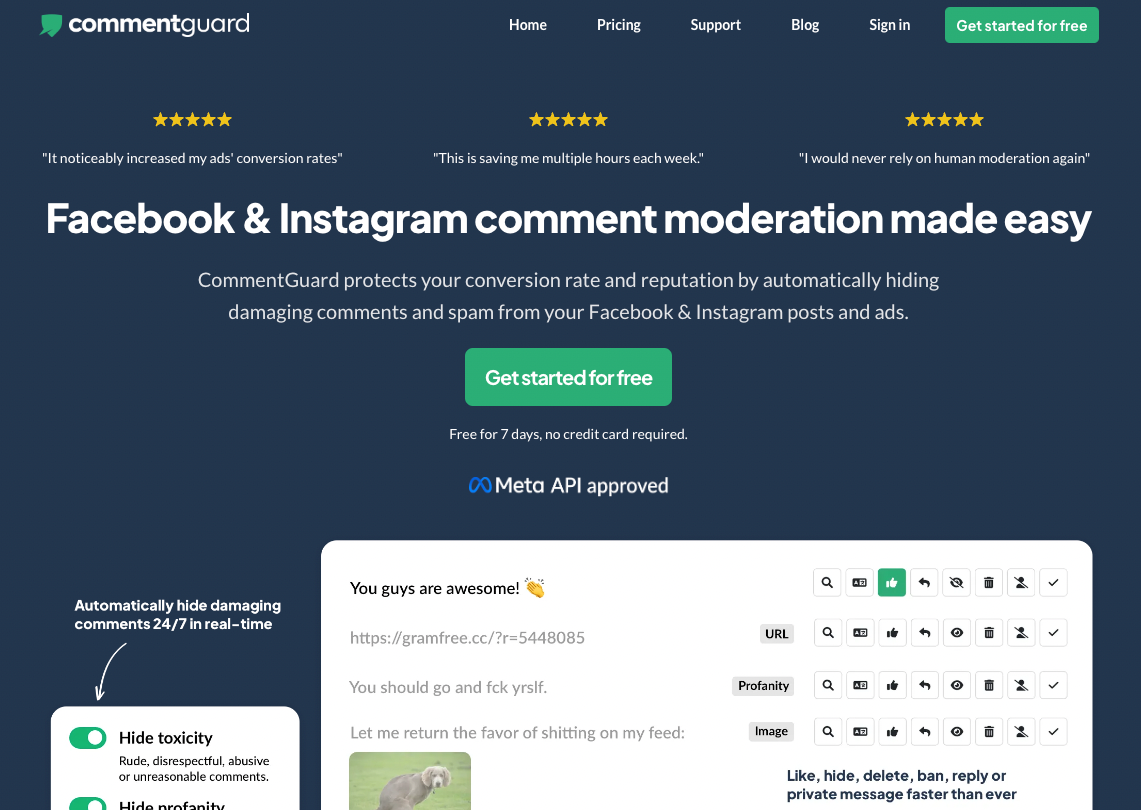
Add Comment Guard: Comment Guard is a tool that manages and hides unwanted comments on your Facebook ads. It's a helpful social media management tool to have in your toolbox. As you know, social proof is important to maintain to be effective with ads.
Rinse and Repeat: Even if your Facebook boost post ends, you can always add more money until you achieve desired result.
Facebook Boost Post vs. Facebook Ads: What's the Difference?
Boosted posts and Facebook ads both serve a common purpose. They work to improve visibility and reach specific goals. However, the methods they employ vary greatly.
Boosted posts provide an easy way to promote content. They are user-friendly and perfect for those new to Facebook advertising. Boosting a post can quickly improve its reach and engagement.
On the other hand, Facebook ads have much more to offer. They provide advanced targeting features for advertisers.
Customization options enable you to fine-tune your ad campaigns.
These advanced tools allow for more complex strategies. As a result, you can create multifaceted campaigns that cater to specific objectives. This makes Facebook ads a powerful advertising option.
Despite their differences, both boosted posts and Facebook ads are valuable tools. The best approach depends on your experience, goals, and target audience. They can be used together for optimal results or individually to suit specific needs.
In conclusion, understanding the differences between boosted posts and Facebook ads is essential.
This knowledge will help you make informed decisions about your advertising approach. Utilize these tools effectively to maximize the potential of your Facebook marketing efforts.
When to Use Boosted Posts and When to Use Facebook Ads
Deciding between using boosted posts or Facebook ads can be challenging.
It's essential to identify your marketing goals and your expertise level. Knowing when to use each tool can maximize your advertising efforts.
Consider using boosted posts for your campaigns when you want to focus on promoting specific content. They are perfect for sharing an essential blog post, a limited-time sale, or a new product announcement.
The simplicity of boosted posts allows you to get your message out quickly.
Boosted posts are a great starting point for those new to Facebook advertising. They are easy to set up and manage, allowing you to learn the basics of promoting your content on the platform.
If you have a limited budget, boosted posts are also ideal. Their minimal cost allows you to test the waters without committing to larger advertising expenditures.
Facebook ads, on the other hand, are best suited for those with more advanced advertising needs. They provide a range of options for targeting and customizing your ad campaign.
Leverage the power of Facebook ads when you want to create custom audiences and lookalike audiences. These features allow you to reach a highly targeted and relevant group of users who are more likely to engage with your content.
Lastly, consider using Facebook ads when you need to test multiple ad variations. This enables you to optimize your campaign's performance and find the most effective ad for your goals.
Both boosted posts and Facebook ads offer unique advantages.
Evaluate your advertising needs, experience, and budget to determine the best approach for your campaigns. You can optimize your Facebook marketing efforts for maximum results by making the right choice.
Best Practices for Boosting a Post on Facebook

To succeed with boosted posts, it's crucial to set clear objectives.
Knowing what you want to accomplish, such as driving more traffic to your website or increasing conversions, will guide your strategy and help you measure the effectiveness of your efforts.
Selecting high-performing posts for boosting is another essential factor. By choosing posts that already have strong organic reach, you increase the likelihood of further success with a boosted post.
These popular posts have proven to appeal to your audience, making them ideal candidates for promotion.
Finding the right audience can significantly impact your boosted post's performance. Be specific in your targeting, focusing on demographics, interests, and behaviors relevant to your content. This precision makes it more likely that the people who see your boosted post will engage with it.
Budgeting for your boosted posts is vital for maximizing your investment. Starting with a small budget allows you to test how well the boosted post performs. If you notice positive results over several days, you can consider increasing your budget to capitalize on the post's success.
Monitoring and analyzing your boosted post's performance is the key to optimizing your campaigns. Keep track of metrics such as engagement, reach, and conversions to make data-driven decisions.
By continually assessing your results, you can adjust your strategy accordingly and make the most of your boosted posts. This proactive approach ensures your advertising efforts on Facebook yield the best results possible.
FAQs on How to Boost an Ad on Facebook
How much does it cost to boost a Facebook ad?
The cost of boosting a Facebook ad can vary, depending on your target audience, duration, and budget. You can start with as little as $1 per day and adjust based on the results.
How does boosting an ad on Facebook work?
Boosting an ad on Facebook involves promoting an existing post on your Facebook page to reach a larger audience. Paying a certain amount increases the post's social media visibility and engagement with your target audience.
How do I boost my Facebook listing?
To boost your Facebook listing, click the "Boost Post" button below the post you want to promote. Follow the prompts to set your objective, target audience, budget, and duration, then submit your boosted post.
Why can't I boost my FB ad?
There may be several reasons, including not having a Facebook Ads account, not being an admin of the page, or your post not complying with Facebook's ad policies. Check these factors and make the necessary adjustments to boost your ad.
Is boosting ads on Facebook worth it?
Boosting ads on Facebook can be worth it when done with a clear strategy, targeting the right audience, and monitoring performance. It can help increase your reach, engagement, and conversions on social media, making it a valuable tool in your marketing plan.
Is $100 enough for Facebook ads?
A $100 budget can be enough for Facebook ads, particularly if used wisely and allocated to well-performing campaigns. It's best to start small, analyze performance, and adjust the budget as needed.
Is it better to run a Facebook ad or boost a post?
The choice depends on your goals and experience. Boost ads on Facebook is a simpler method, ideal for beginners, while running a Facebook ad provides more advanced targeting and customization options for experienced advertisers.
You can boost a post directly from your Facebook Business Page without having to go into Facebook Ads Manager.
Is boosting better than ads?
Boosting is not necessarily better than ads; it depends on the goal, budget, and level of experience. Boosting a Facebook post is excellent for quickly promoting specific content, while ads deliver more options for targeting and customization.
What's the difference between a boost and an ad on Facebook?
The main difference lies in their complexity and customization options. Facebook Boost Ads is a simpler way to promote an existing Facebook post, while Facebook ads provide more advanced targeting and campaign creation tools.
How can I boost my FB post without paying?
Without paying, you can improve your post's organic reach by optimizing the content, posting at strategic times, and leveraging your existing network to like, comment, and share the post.
If you are not interested in paying, you can just directly post to social media to get organic traffic.
How often should you boost posts on Facebook?
There's no definitive answer, but it's best to focus on boosting high-performing posts and adjusting your strategy based on performance data. Monitor results and find the frequency that works best for your business.
If a Facebook post is already performing well on social media, it makes a great candidate for a boosted post on Facebook.
Does Facebook ads charge per day?
Facebook ads charges are based on a daily or a lifetime budget. With a daily budget, you have a set amount you're willing to spend each day, while a lifetime budget distributes your set amount evenly throughout the campaign duration.
Final Thoughts
Boosting a post on Facebook is an excellent way to increase your reach and engage more people without spending a fortune.
With a clear strategy and following the best practices mentioned above, you can make the most of your boosted posts and improve your Facebook advertising efforts.
Don't be afraid to experiment!
The more you try, the better results you'll see.
So hit that boost post button.
Happy boosting!